Chapter 4 — Dockerfile: Write Your Own Image
Course: Docker (Zero to Hero) · Chapter: 4 of 8 Read on the website: learn.bazardev.com/docker/04-dockerfile
🇧🇩 Prefer Bangla? Read this chapter in Bangla →
So far you've only used images other people built (nginx, hello-world). Today you write your own. A Dockerfile is nothing more than a text file with step-by-step instructions for building an image — literally the recipe from Chapter 1, written down.
1. The instructions you'll actually use
| Instruction | What it does |
|---|---|
FROM |
The base image to start from (your bottom layer) |
WORKDIR |
Sets the "current folder" inside the image for the instructions that follow |
COPY |
Copies files from your machine into the image |
RUN |
Runs a command while building the image (e.g. installing packages) |
ENV |
Sets an environment variable inside the image |
EXPOSE |
Documents which port the container listens on (doesn't actually publish it — that's still -p at docker run time) |
CMD |
The default command that runs when a container starts |
2. A real, minimal Dockerfile
Create a folder with two files.
app.js:
const http = require('http');
http.createServer((req, res) => res.end('Hello from inside a container!')).listen(3000);
console.log('Listening on port 3000');
Dockerfile (no file extension, exactly this name):
FROM node:20-alpine
WORKDIR /app
COPY app.js .
EXPOSE 3000
CMD ["node", "app.js"]
Build it:
docker build -t my-first-app .
-t my-first-app— tags (names) the image so you can refer to it later..— the build context: the folder Docker looks in for the files yourCOPYinstructions reference. (This is also why you should never rundocker buildfrom a folder with huge unrelated files in it — Docker has to read the whole folder first.)
Run it:
docker run -d -p 3000:3000 my-first-app
curl http://localhost:3000
You should see Hello from inside a container! — code you wrote, running inside an image you built, from a Dockerfile you wrote. That's the whole loop.
3. Instruction order matters — build caching
Docker caches each instruction in a Dockerfile as its own layer (this is the same layering you saw in Chapter 3). On a rebuild, if an instruction and everything above it haven't changed, Docker reuses the cached result instead of running it again — instant, instead of slow.
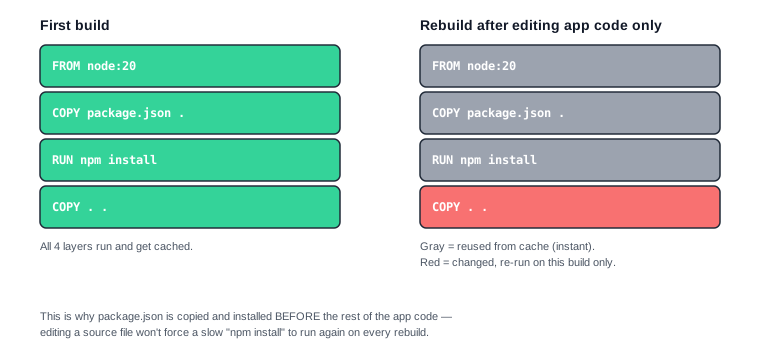
This is why real-world Dockerfiles separate dependency installation from copying app code:
FROM node:20-alpine
WORKDIR /app
COPY package.json .
RUN npm install
COPY . .
CMD ["node", "app.js"]
package.json rarely changes, so npm install almost never needs to re-run. Only COPY . . (and anything after it) re-runs when you edit your actual source code — which makes rebuilds dramatically faster. If you instead wrote COPY . . before npm install, editing even a single line of code would force a full dependency reinstall every time.
4. CMD vs ENTRYPOINT (the common confusion)
Both specify what runs when the container starts. The practical difference:
CMDis a default — easy to override.docker run my-first-app node other-script.jsignores the Dockerfile'sCMDentirely and runsother-script.jsinstead.ENTRYPOINTis fixed — anything you add after the image name atdocker rungets appended to it, not used to replace it.
For most simple images, CMD alone is all you need. ENTRYPOINT is for when you want the container to always behave like a specific command-line tool, no matter what arguments someone passes.
5. .dockerignore
Just like .gitignore, a .dockerignore file tells Docker which files to skip when building — keep node_modules, .git, and vendor out of your build context so builds stay fast and images stay small:
node_modules
.git
vendor
*.log
6. Key takeaways
- A Dockerfile is a text file of build instructions —
FROM,WORKDIR,COPY,RUN,EXPOSE,CMD. docker build -t <name> .builds an image from the Dockerfile in the current folder.- Order your instructions from least to most frequently changing, so caching actually saves you time.
CMDis a default that can be overridden;ENTRYPOINTis fixed and only gets arguments appended to it..dockerignorekeeps unnecessary files out of your build context.
7. Test yourself (exam prep)
Q1. Why does `docker build -t my-first-app .` need that trailing `.`?
That . is the build context — the folder Docker sends to the daemon, and the folder your Dockerfile's COPY instructions are relative to. Without it, docker build doesn't know which files it's allowed to copy into the image.
Q2. Why copy `package.json` and run `npm install` before copying the rest of the app code?
Because Docker caches each instruction as a layer. If package.json hasn't changed, npm install can reuse its cached result instead of re-running — so editing only your source code doesn't force a slow reinstall every time you rebuild.
Q3. If a Dockerfile has `CMD ["node", "app.js"]`, what happens when you run `docker run my-first-app node other.js`?
The command you pass at docker run replaces CMD entirely, so other.js runs instead of app.js. This would behave differently with ENTRYPOINT, where other.js would be appended as an argument instead.
Q4. What does `EXPOSE 3000` actually do?
It's documentation — it tells anyone reading the Dockerfile (and some tooling) which port the app listens on inside the container. It does not publish that port to your host machine; you still need -p 3000:3000 at docker run time for that.
8. Free resources
- Official docs: Dockerfile reference
- Official docs: Best practices for writing Dockerfiles
- Video: "Docker Tutorial for Beginners [FULL COURSE in 3 Hours]" — TechWorld with Nana (includes a full Dockerfile walkthrough)
Next: Chapter 5 — Volumes & Networking → (coming soon)